
How custom amounts work
Custom amounts are for when you need more than your plan includes, or just one service without a plan. You pick how much of each metric you want on one platform, 10 at a time, and you pay once. What you buy stays on your account until you use it: no renewal, no reset, no expiry date. The amounts add to your plan there, or work on their own if you have no plan. A purchase starts at $5.
Build a custom purchase in the Custom tab
- Open plans and prices, pick the platform, then press Custom.
- Open a metric’s row on the right. The Rate line shows the price per unit.
- Move the slider or type an amount. The row then reads, for example, “5,000 followers · One-time”.
- Do the same for every metric you want. To drop one again, press Remove under its slider.
- Check the lines and the total on the left, then press Buy Now.
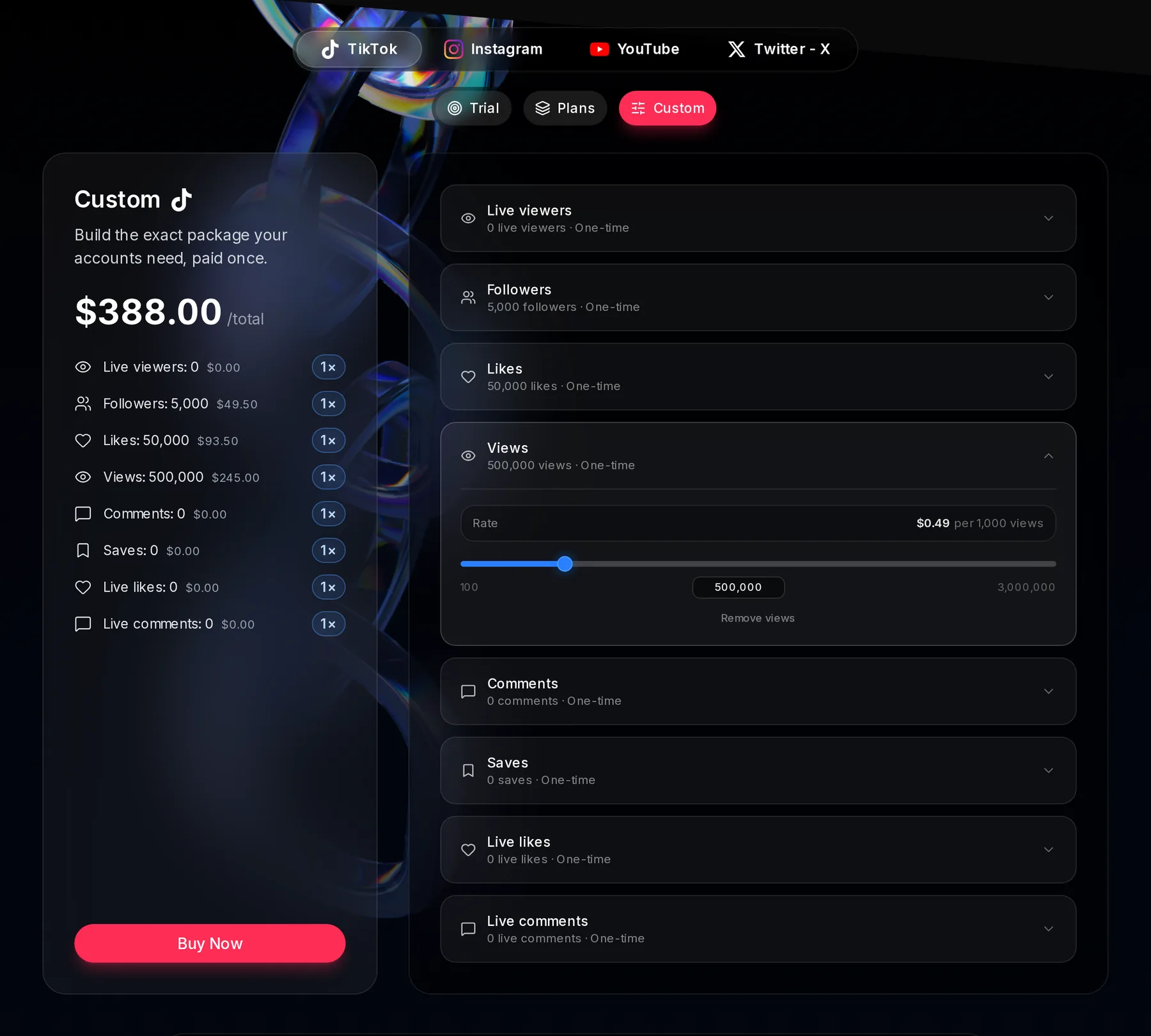
- Custom tab
- The one-time total
- A metric you picked, with its price
- A metric row, opened
- Its rate per unit
- Its slider
- Buy Now
The slider moves 10 at a time (live viewers on X by 50), and an amount you type below a metric’s starting amount is raised to it. A purchase has to reach $5 in total. Below that the button stays grey and the card says “Custom purchases start at $5.”
What you buy never expires
A custom amount is a one-time purchase. It goes into that platform’s balance and waits there until you use it, however long that takes. Nothing renews, nothing resets on a Monday, and there is no date to keep an eye on. Buy 5,000 TikTok followers today, start 1,000 of them next week and the other 4,000 are still there a year later.
- No billing period. Custom has no weekly or monthly price, so there is nothing to cancel and no auto-renew discount on it.
- Plans are unchanged. A plan still gives its amounts every 7 or 30 days, still expires and can still auto-renew with 10% off when you pay by card.
- The exception: live viewers on YouTube and X, because they are a cap on how many at once rather than an amount that runs out. They come with 7 or 30 days of access, and when that ends the cap stops. TikTok live viewers work differently: you buy viewers and hours together, and those hours never expire (see below).
Where each custom metric starts
Most metrics start small and go up 10 at a time: from 10, or from the smallest amount one instance can start when that is higher, so whatever you buy can always be started. A metric is either not included or somewhere between its starting amount and its maximum, which is as much as Socialbot can deliver to one account in 30 days.
- Followers: from 10 on TikTok and X, from 100 on Instagram; YouTube subscribers from 50.
- Views: TikTok views from 100, Instagram Reel views from 50, YouTube views from 100 and Shorts views from 50.
- Likes and comments: from 10 in most places; X likes from 100 and YouTube likes from 20.
- YouTube live viewers start at the Elite amount: 300 at once. They are a cap on how many at once, and up to Elite’s 300 is what the plans are for.
- Live viewers on X start at 100 at once and go up 50 at a time. No X plan includes them, so Custom is where you add them.
The rate tables below list the start for every metric. A purchase has to reach $5, so small amounts go together: 100 TikTok followers ($0.99), 2,000 likes ($3.74) and 1,000 views ($0.49) come to $5.22. One metric can reach it alone too, such as 510 TikTok followers for $5.05.
Custom rates and starting amounts for each metric
Every metric has one rate. Each line is rounded to the cent, and the total is what you pay once.
| Metric | Rate | Starts at | Step | Maximum |
|---|---|---|---|---|
| Live viewers (viewers and hours) | $1.99 per 100 viewers, per hour | 10 | 10 | 5,000 at once |
| Followers | $0.99 per 100 | 50 | 10 | 150,000 |
| Likes | $1.87 per 1,000 | 50 | 10 | 150,000 |
| Views | $0.49 per 1,000 | 100 | 10 | 3,000,000 |
| Comments | $0.25 per 10 | 10 | 10 | 30,000 |
| Saves | $0.23 per 100 | 50 | 10 | 60,000 |
| Live likes | $0.09 per 1,000 | 100 | 10 | 900,000 |
| Live comments | $0.39 per 100 | 10 | 10 | 150,000 |
| Metric | Rate | Starts at | Step | Maximum |
|---|---|---|---|---|
| Followers | $1.99 per 100 | 100 | 10 | 300,000 |
| Likes | $1.31 per 1,000 | 10 | 10 | 300,000 |
| Reel views | $0.07 per 1,000 | 100 | 10 | 3,000,000 |
| Comments | $1.38 per 10 | 10 | 10 | 9,000 |
| Story views | $0.49 per 1,000 | 10 | 10 | 450,000 |
| Reel shares | $0.99 per 1,000 | 10 | 10 | 300,000 |
| Metric | Rate | Starts at | Step | Maximum |
|---|---|---|---|---|
| Live viewers (at once) | $1.20 per 10 for 7 days, $4.80 per 10 for 30 days | 300 | 10 | 100,000 |
| Views | $1.61 per 1,000 | 100 | 10 | 15,000 |
| Subscribers | $0.49 per 10 | 50 | 10 | 6,000 |
| Likes | $2.24 per 1,000 | 20 | 10 | 300,000 |
| Shorts views | $4.99 per 1,000 | 50 | 10 | 90,000 |
| AI chat messages | $0.70 per 100 | 10 | 10 | 400,000 |
| Metric | Rate | Starts at | Step | Maximum |
|---|---|---|---|---|
| Live viewers (at once) | $34.99 per 100 for 7 days, $149.99 per 100 for 30 days | 100 | 50 | 9,900 |
| Followers | $2.09 per 100 | 10 | 10 | 300,000 |
| Likes | $8.99 per 1,000 | 100 | 10 | 900,000 |
| Retweets | $2.49 per 100 | 100 | 10 | 10,000 |
| Views | $0.09 per 1,000 | 100 | 10 | 3,000,000 |
| Replies | $2.29 per 10 | 10 | 10 | 3,000 |
The picture above adds up like this: 5,000 followers at $0.99 per 100 is $49.50, 50,000 likes at $1.87 per 1,000 is $93.50 and 500,000 views at $0.49 per 1,000 is $245.00, so $388.00 once.
If you want a bit of everything, a plan is the better buy. TikTok Elite weekly’s whole mix built here would cost $171.80 against $99.99 for the plan, and the plan gives you that mix again every 7 days. Take the plan and add custom where you run short.
How custom amounts add to your plan
Everything you pick adds to what your plan includes on that platform. TikTok Elite weekly gives 2,000 followers every 7 days; add 2,500 custom followers for $24.75 and you can start up to 4,500 followers straight away. The number available when you start an instance and the tiles in Settings, Subscription show the combined amount, with a line for the plan and one for each custom item, such as “Elite 0 of 3,500 left” and “Custom 1,000 of 2,500 left”.
The difference is what happens next week. The plan’s 3,500 come back on day 7; the custom followers don’t need to, because whatever you haven’t used is still sitting there.
- One custom item per service. Every service you buy is its own item, with its own price, next to your tier or trial.
- Buying a tier keeps your custom amounts. Moving from Starter to Pro changes only the plan’s part.
- Buying a service again adds to it. New custom followers are added to whatever is left of your current ones, so nothing you paid for is lost and you can top up whenever you like. Live viewers are the exception: they are a cap, so the new amount and a fresh access length take over. Your other custom items and the plan stay, and a service you don’t have yet is added next to them.
- No plan needed. Custom works on its own, and every account you add on that platform shares it, as with a plan’s allowance.
Which allowance an instance uses first
An instance takes from your plan (or trial) first and moves on to that service’s custom amount only when the plan’s is used up. The plan is what you pay for either way, and it comes back next period, so it goes first and your custom amount lasts longer.
Say you’re on TikTok Elite weekly (2,000 followers) with 2,500 custom followers. Starting 3,000 followers takes 2,000 from Elite and 1,000 from the custom ones. If 300 of them aren’t delivered, those 300 go back to the custom followers, the last part that instance drew from.
The plan’s part resets on its own clock, every 7 or 30 days (how allowances work). The custom part has no clock: it only goes down when you use it.
Live viewers: pick 7 or 30 days of access
Live viewers aren’t an amount you use up. The number is the most viewers you can have at once, usable on every stream, so a custom live-viewer cap is sold with an access length instead. On YouTube that is 7 days at $1.20 per 10 or 30 days at $4.80 per 10. On X it is $34.99 per 100 viewers for 7 days or $149.99 for 30, from 100 at once, and no X plan includes live viewers, so Custom is the only way to have them. Those rows have an Access choice; no other row has one.
- 500 more YouTube viewers at once: $60.00 for 7 days of access, or $240.00 for 30 days.
- While it runs it adds to your plan’s cap: with YouTube Elite (300 at once) you can have 800 viewers on every stream, and with Pro (150) you get 650.
- When the access ends only that custom cap stops. Your plan’s own live viewers carry on, and every other custom amount you hold is untouched.
Settings, Subscription shows the date the access ends next to the item. Buying live viewers again replaces the item with the new amount and a fresh access length.
TikTok live viewers have no access length. They are one row: set how many viewers, then pick the hours of stream under Hours of stream. The price is $1.99 per 100 viewers for each hour, so 300 viewers for 4 hours costs $23.88. The hours stay on your account until you use them, and the dashboard shows how many are left before every boost.
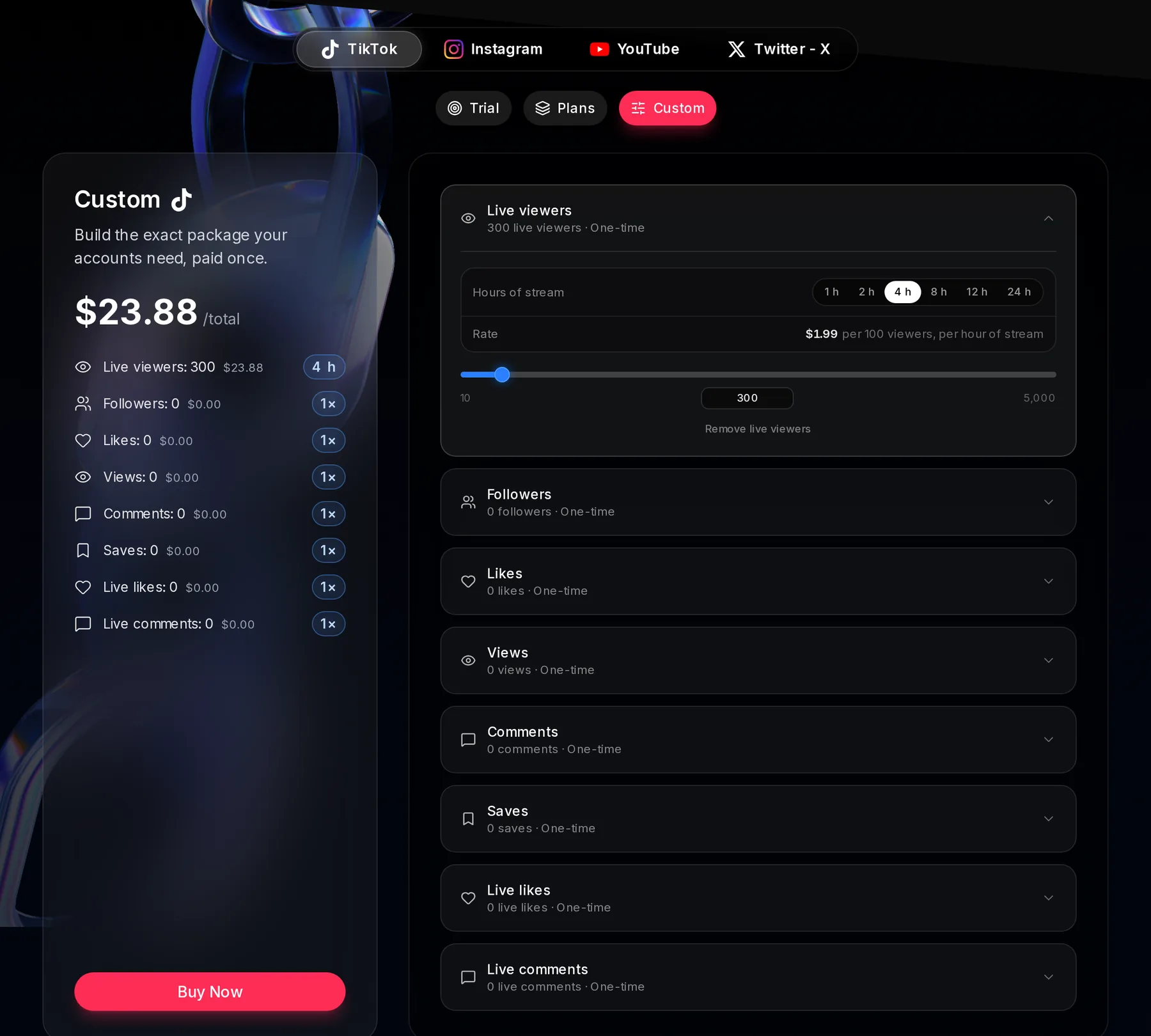
- The Live viewers row, opened
- Hours of stream: 1 to 24 hours
- The rate per 100 viewers, per hour
- The one-time total
How custom amounts behave once you buy them
- Same dashboard, same rules. The smallest amount you can start is the same.
- Metrics at zero aren’t included. If neither your plan nor your custom amounts include a metric, you can’t start it and the form says “Your plan doesn’t include” that metric.
- Same payment options. Card, Apple Pay or Google Pay through Stripe, or crypto through Cryptomus. The 10% auto-renew discount belongs to the plans; custom is paid once, so there’s nothing to renew.
- Nothing to cancel. There is no subscription behind a custom amount, and what you don’t use stays yours.